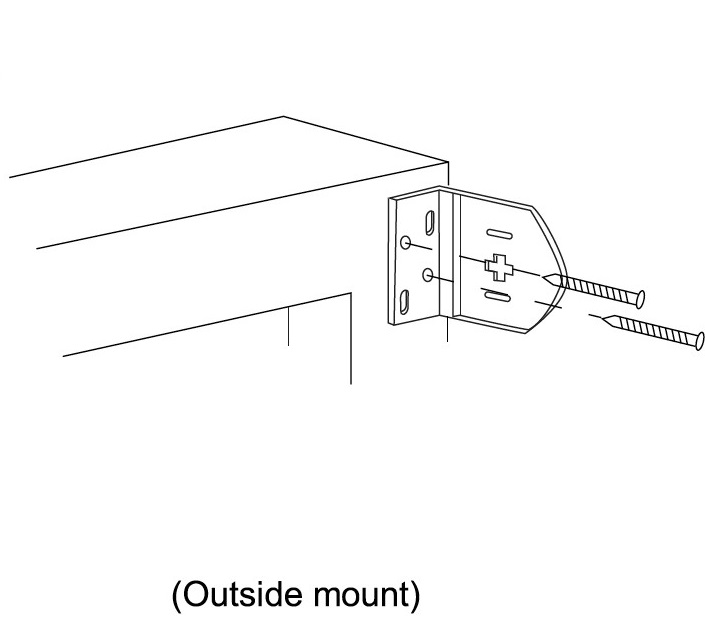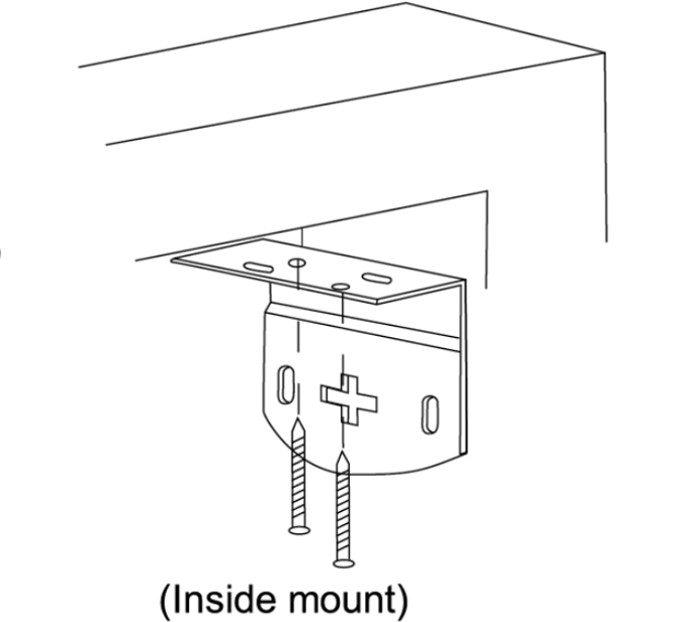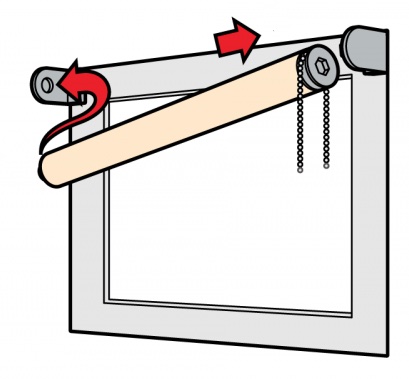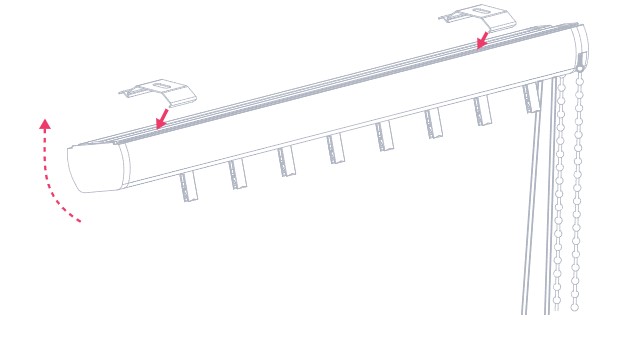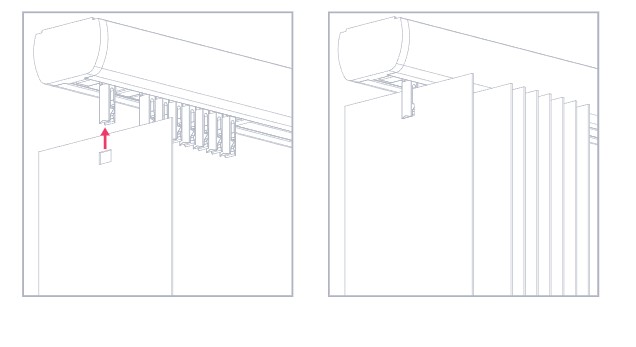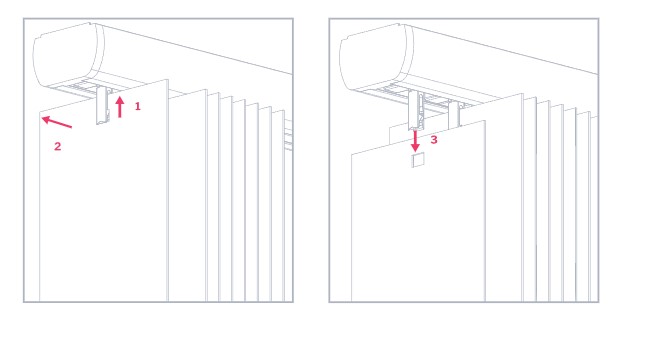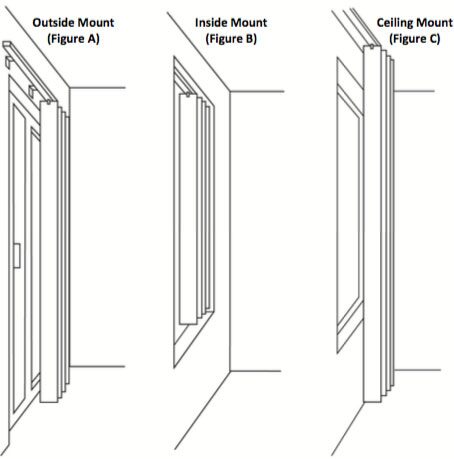



<section class="hero-img"> <div class="container-fluid pl-0 pr-0"> <div class="row pl-0 pr-0"> <div class="col-xl-12 col-lg-12 col-md-12 col-sm-12 col-1 col-12 pl-0 pr-0"><img alt="" class="d-block w-100" src="https://ecommerce.blinq.com.au/ab-6234082a26a73/images/uploads/images/bg-apollo1.jpg" /> <div class="topTitle carousel-caption"> <h1 class="font-weight-bold text-white">HOW TO INSTALL GUIDE</h1> <small>Please toggle each tab to read the "How to Install"guides for each product</small></div> <div class="overlayTop"> </div> </div> </div> </div> </section> <section class="measur-list" role="tablist"> <div class="container"> <div class="row justify-content-center"> <ul class="nav nav-pills mb-3 col-lg-12" id="pills-tab" role="tablist"> <li class="nav-item col-lg-3" role="presentation"><button aria-controls="pills-home" aria-selected="true" class="nav-link active" data-target="#roller" data-toggle="pill" id="pills-home-tab" role="tab" type="button">Roller Blinds</button></li> <li class="nav-item col-lg-3" role="presentation"><button aria-controls="pills-vertical" aria-selected="false" class="nav-link" data-target="#vertical" data-toggle="pill" id="pills-vertical-tab" role="tab" type="button">Vertical Blinds</button></li> <li class="nav-item col-lg-3" role="presentation"><button aria-controls="pills-panelglide" aria-selected="false" class="nav-link" data-target="#panelglide" data-toggle="pill" id="pills-panelglide-tab" role="tab" type="button">Panel Glides</button></li> <li class="nav-item col-lg-3" role="presentation"><button aria-controls="pills-timber" aria-selected="false" class="nav-link" data-target="#timber" data-toggle="pill" id="pills-timber-tab" role="tab" type="button">Timber Look Venetians</button></li> </ul> </div> </div> </section> <div class="tab-content" id="pills-tabContent"> <div aria-labelledby="roller-tab" class="tab-pane fade show active" id="roller" role="tabpanel"> <section class="step-wm"> <h1 class="text-center mb-5">HOW TO INSTALL A ROLLER BLIND​​</h1> <div class="container"> <div class="row"> <div class="col-md-12 text-center "> <h4 class="text-orange">Tools You Need<span class="hr1 bg-grey"></span></h4> <div class="col-md-12 mt-4"> <div class="row d-flex justify-content-center"> <div class="col-md-2 text-center"> <h6>Metal Tape Measure</h6> <img alt="" class="img-fluid w-50" src="https://ecommerce.blinq.com.au/ab-6234082a26a73/images/uploads/images/measuring_tape.jpg" /></div> <div class="col-md-2 text-center"> <h6>Pencil</h6> <img alt="" class="img-fluid w-50" src="https://ecommerce.blinq.com.au/ab-6234082a26a73/images/uploads/images/pencil.png" /></div> <div class="col-md-2 text-center"> <h6>Drill</h6> <img alt="" class="img-fluid w-50" src="https://ecommerce.blinq.com.au/ab-6234082a26a73/images/uploads/images/drill.png" /></div> <div class="col-md-2 text-center"> <h6>Spirit Level</h6> <img alt="" class="img-fluid w-50" src="https://ecommerce.blinq.com.au/ab-6234082a26a73/images/uploads/images/spirit.png" /></div> <div class="col-md-2 text-center"> <h6>Step Ladder</h6> <img alt="" class="img-fluid w-50" src="https://ecommerce.blinq.com.au/ab-6234082a26a73/images/uploads/images/step-ladder.png" /></div> </div> </div> </div> </div> </div> </section> <section class="step-1 bg-light mt-5"> <div class="container"> <div class="row"> <div class="col-md-12"> <h4 class="text-center px-2 py-2 mb-3 "><span class="text-orange">Step 1:</span> We have positioned the controls where you requested during the ordering process.</h4> <h4 class="text-dark text-center rounded mb-5"><span class="text-orange">Step 2:</span> Fitting the bracket options</h4> <div class="row"> <div class="col-md-4"> <div class="card shadow text-center p-3"> <h4 class="card-title">Top Fitting</h4> <p>Where the brackets are screwed into the top of the reveal</p> <img alt="" class="img-fluid" src="https://ecommerce.blinq.com.au/ab-6234082a26a73/images/uploads/images/roller-blind-installation.png" /></div> </div> <div class="col-md-4"> <div class="card shadow text-center p-3"> <h4 class="card-title">Face-Fixing</h4> <p>Where the brackets are screwed onto a facing surface a wall or window frame</p> <img alt="" class="img-fluid" src="https://ecommerce.blinq.com.au/ab-6234082a26a73/images/uploads/images/outside-mount-howtoinstall.jpg" /></div> </div> <div class="col-md-4"> <div class="card shadow text-center p-3"> <h4 class="card-title">Side-Fixing</h4> <p>Where the brackets are screwed into the side walls of the reveal</p> <img alt="" class="img-fluid" src="https://ecommerce.blinq.com.au/ab-6234082a26a73/images/uploads/images/inside-mount-howtoinstall.jpg" /></div> </div> </div> </div> </div> </div> </section> <section class="step-2"> <div class="container"> <div class="row"> <div class="col-md-12"> <h4 class="px-2 py-2 text-center rounded mb-5"><span class="text-orange">Step 3:</span> Fitting the blind</h4> <div class="box1"> <div class="row mb-4 d-flex align-items-center"> <div class="col-md-7"> <h6 class="mb-4 strong-1"><span class="text-orange">01. </span> Locate the control chain end (the opposite end to the idler round pin end) of the blind into the rectangular ‘lugs’bracket.</h6> <h6 class="mb-4 strong-1"><span class="text-orange">02. </span>Lift the idler round pin end of the blind and slot the round pin into the corresponding hole on the bracket.</h6> </div> <div class="col-md-5 text-center"><img alt="" class="img-fluid" src="https://ecommerce.blinq.com.au/ab-6234082a26a73/images/uploads/images/Roller.jpeg" /></div> </div> </div> </div> </div> </div> </section> <section class="sec3 bg-light"> <div class="container"> <div class="row"> <div class="col-md-12 text-center"> <h4 class="mb-4"><span class="text-orange">Step 4:</span> Child Safety</h4> <p class="ml-4">The cord retaining device must be installed at the maximum distance possible from the control mechanism to prevent looped cords from becoming slack. Place the retaining device on the wall and mark the position of the screw hole(s) with a pencil. Attach the retaining device to the wall using the fixings provided.</p> </div> </div> </div> </section> </div> <div aria-labelledby="vertical-tab" class="tab-pane fade" id="vertical" role="tabpanel"> <section class="step-wm"> <h1 class="text-center mb-5">HOW TO INSTALL A VERTICAL BLIND​​</h1> <div class="container"> <div class="row"> <div class="col-md-12 text-center "> <h4 class="text-orange">Tools You Need<span class="hr1 bg-grey"></span></h4> <div class="col-md-12 mt-4"> <div class="row d-flex justify-content-center"> <div class="col-md-2 text-center"> <h6>Metal Tape Measure</h6> <img alt="" class="img-fluid w-50" src="https://ecommerce.blinq.com.au/ab-6234082a26a73/images/uploads/images/measuring_tape.jpg" /></div> <div class="col-md-2 text-center"> <h6>Pencil</h6> <img alt="" class="img-fluid w-50" src="https://ecommerce.blinq.com.au/ab-6234082a26a73/images/uploads/images/pencil.png" /></div> <div class="col-md-2 text-center"> <h6>Drill</h6> <img alt="" class="img-fluid w-50" src="https://ecommerce.blinq.com.au/ab-6234082a26a73/images/uploads/images/drill.png" /></div> <div class="col-md-2 text-center"> <h6>Spirit Level</h6> <img alt="" class="img-fluid w-50" src="https://ecommerce.blinq.com.au/ab-6234082a26a73/images/uploads/images/spirit.png" /></div> <div class="col-md-2 text-center"> <h6>Step Ladder</h6> <img alt="" class="img-fluid w-50" src="https://ecommerce.blinq.com.au/ab-6234082a26a73/images/uploads/images/step-ladder.png" /></div> </div> </div> </div> </div> </div> </section> <section class="step-1 bg-light mt-5"> <div class="container"> <div class="row"> <div class="col-md-12"> <h4 class="text-center px-2 py-2 mb-3 "><span class="text-orange">Step 1:</span> Fitting the brackets</h4> <h4 class="text-dark text-center rounded mb-5">There are two types of brackets for vertical blinds, each of which offers a different method of installation:</h4> <div class="row"> <div class="col-md-6"> <div class="card shadow text-center p-3"> <h4 class="card-title">Top Fitting</h4> <p>Use the single hole in the top of the bracket to fix to the top of the reveal. The protruding tab on the bracket should be closest to the window</p> <img alt="" class="img-fluid" src="https://ecommerce.blinq.com.au/ab-6234082a26a73/images/uploads/images/Vertical-Blind-Track-Installation.jpg" /></div> </div> <div class="col-md-6"> <div class="card shadow text-center p-3"> <h4 class="card-title">Face-Fixing</h4> <p>Join the bracket to the ‘L’shaped face-fixing plate. Use two screws through the back plate to mount onto a facing surface a wall or window frame</p> <img alt="" class="img-fluid" src="https://ecommerce.blinq.com.au/ab-6234082a26a73/images/uploads/images/Vertical-Blind-Slat-Installation-01.jpg" /></div> </div> <div class="col-12 mt-5"> <div class="media"><img alt="Generic placeholder image" class="align-self-start col-4 rounded shadow-sm p-0 mr-3" src="https://ecommerce.blinq.com.au/ab-6234082a26a73/images/uploads/images/Vertical-Blind-Track-Installation-01.jpg" /> <div class="media-body"> <h5 class="mt-0">Note:</h5> <p>that the position of the outermost brackets should be at least 5cm away from the ends of the rail, with any other brackets evenly distributed across the width.</p> </div> </div> </div> <div class="col-12 mt-5"> <div class="media"><img alt="Generic placeholder image" class="align-self-start rounded p-0 shadow-sm col-4 mr-3" src="https://ecommerce.blinq.com.au/ab-6234082a26a73/images/uploads/images/Vertical-Blind-Slat-Removal.jpg" /> <div class="media-body"> <h5 class="mt-0">If you’re using top-fix brackets:</h5> <p>make sure that you mount them at least 75mm in front of either the window frame, or any protruding vents or handes, if there are any. This allows space for the louvres to turn open and closed.</p> </div> </div> </div> </div> </div> </div> </div> </section> <section class="step-2"> <div class="container"> <div class="row"> <div class="col-md-12"> <h4 class="px-2 py-2 text-center rounded mb-5"><span class="text-orange">Step 2:</span> Fitting the blind</h4> <div class="box1"> <div class="row mb-4 d-flex align-items-center"> <div class="col-md-7"> <h6 class="mb-4 strong-1">Situate the front lip of the headrail into the front of the bracket. Lift the back of the headrail and push up firmly to secure the back of the rail into the bracket.</h6> </div> <div class="col-md-5 text-center"><img alt="" class="img-fluid" src="https://ecommerce.blinq.com.au/ab-6234082a26a73/images/uploads/images/vertical-blinds-1.jpg" /></div> </div> </div> </div> </div> </div> </section> <section class="sec3 bg-light"> <div class="container"> <div class="row"> <div class="col-md-12 text-center"> <h4 class="mb-4"><span class="text-orange">Step 3:</span> Child Safety - Fitting the card tensioner</h4> <p class="ml-4">Your vertical blind is fully compliant with the latest safety standards. It has been supplied with a ‘P-Clip’tensioning device to keep the cords and the chain child safe. Slot both the cord and the beaded chain into the ‘P-Clip’and secure it to the wall or window frame (if you are fixing to the facing surface then the cord and chain will form a figure of eight, this is fine and will not affect the operation of your blind).</p> <p class="ml-4"><strong>Note:</strong> Please note that the P-clip must be installed. The cord must be kept under tension to prevent it from sagging down from the headrail when the blind is drawn open.</p> </div> </div> </div> </section> </div> <div aria-labelledby="panelglide-tab" class="tab-pane fade" id="panelglide" role="tabpanel"> <section class="step-wm"> <h1 class="text-center mb-5">HOW TO INSTALL A PANEL GLIDES​​</h1> <div class="container"> <div class="row"> <div class="col-md-12 text-center "> <h4 class="text-orange">Tools You Need<span class="hr1 bg-grey"></span></h4> <div class="col-md-12 mt-4"> <div class="row d-flex justify-content-center"> <div class="col-md-2 text-center"> <h6>Metal Tape Measure</h6> <img alt="" class="img-fluid w-50" src="https://ecommerce.blinq.com.au/ab-6234082a26a73/images/uploads/images/measuring_tape.jpg" /></div> <div class="col-md-2 text-center"> <h6>Pencil</h6> <img alt="" class="img-fluid w-50" src="https://ecommerce.blinq.com.au/ab-6234082a26a73/images/uploads/images/pencil.png" /></div> <div class="col-md-2 text-center"> <h6>Drill</h6> <img alt="" class="img-fluid w-50" src="https://ecommerce.blinq.com.au/ab-6234082a26a73/images/uploads/images/drill.png" /></div> <div class="col-md-2 text-center"> <h6>Spirit Level</h6> <img alt="" class="img-fluid w-50" src="https://ecommerce.blinq.com.au/ab-6234082a26a73/images/uploads/images/spirit.png" /></div> <div class="col-md-2 text-center"> <h6>Step Ladder</h6> <img alt="" class="img-fluid w-50" src="https://ecommerce.blinq.com.au/ab-6234082a26a73/images/uploads/images/step-ladder.png" /></div> </div> </div> </div> </div> </div> </section> <section class="step-1 bg-light mt-5"> <div class="container"> <div class="row"> <div class="col-md-12"> <h4 class="text-center px-2 py-2 mb-3 "><span class="text-orange">Step 1:</span> We have positioned the controls where you requested during the ordering process.</h4> <h4 class="text-dark text-center rounded mb-5"><span class="text-orange">Step 2:</span> Fitting the bracket options</h4> <div class="row"> <div class="col-md-4"> <div class="card shadow text-center p-3"> <h4 class="card-title">Top Fitting</h4> <p>Where the brackets are screwed into the top of the reveal</p> <img alt="" class="img-fluid" src="https://ecommerce.blinq.com.au/ab-6234082a26a73/images/uploads/images/roller-blind-installation.png" /></div> </div> <div class="col-md-4"> <div class="card shadow text-center p-3"> <h4 class="card-title">Face-Fixing</h4> <p>Where the brackets are screwed onto a facing surface a wall or window frame</p> <img alt="" class="img-fluid" src="https://ecommerce.blinq.com.au/ab-6234082a26a73/images/uploads/images/outside-mount-howtoinstall.jpg" /></div> </div> <div class="col-md-4"> <div class="card shadow text-center p-3"> <h4 class="card-title">Side-Fixing</h4> <p>Where the brackets are screwed into the side walls of the reveal</p> <img alt="" class="img-fluid" src="https://ecommerce.blinq.com.au/ab-6234082a26a73/images/uploads/images/inside-mount-howtoinstall.jpg" /></div> </div> </div> </div> </div> </div> </section> <section class="step-2"> <div class="container"> <div class="row"> <div class="col-md-12"> <h4 class="px-2 py-2 text-center rounded mb-5"><span class="text-orange">Step 3:</span> Fitting the blind</h4> <div class="box1"> <div class="row mb-4 d-flex align-items-center"> <div class="col-md-7"> <h6 class="mb-4 strong-1"><span class="text-orange">01. </span> Locate the control chain end (the opposite end to the idler round pin end) of the blind into the rectangular ‘lugs’bracket.</h6> <h6 class="mb-4 strong-1"><span class="text-orange">02. </span>Lift the idler round pin end of the blind and slot the round pin into the corresponding hole on the bracket.</h6> </div> <div class="col-md-5 text-center"><img alt="" class="img-fluid" src="https://ecommerce.blinq.com.au/ab-6234082a26a73/images/uploads/images/Roller.jpeg" /></div> </div> </div> </div> </div> </div> </section> <section class="sec3 bg-light"> <div class="container"> <div class="row"> <div class="col-md-12 text-center"> <h4 class="mb-4"><span class="text-orange">Step 4:</span> Child Safety</h4> <p class="ml-4">The cord retaining device must be installed at the maximum distance possible from the control mechanism to prevent looped cords from becoming slack. Place the retaining device on the wall and mark the position of the screw hole(s) with a pencil. Attach the retaining device to the wall using the fixings provided.</p> </div> </div> </div> </section> </div> <div aria-labelledby="timber-tab" class="tab-pane fade" id="timber" role="tabpanel"> <section class="step-wm"> <h1 class="text-center mb-5">HOW TO INSTALL TIMBER LOOK VENETIANS​​</h1> <div class="container"> <div class="row"> <div class="col-md-12 text-center "> <h4 class="text-orange">Tools You Need<span class="hr1 bg-grey"></span></h4> <div class="col-md-12 mt-4"> <div class="row d-flex justify-content-center"> <div class="col-md-2 text-center"> <h6>Metal Tape Measure</h6> <img alt="" class="img-fluid w-50" src="https://ecommerce.blinq.com.au/ab-6234082a26a73/images/uploads/images/measuring_tape.jpg" /></div> <div class="col-md-2 text-center"> <h6>Pencil</h6> <img alt="" class="img-fluid w-50" src="https://ecommerce.blinq.com.au/ab-6234082a26a73/images/uploads/images/pencil.png" /></div> <div class="col-md-2 text-center"> <h6>Drill</h6> <img alt="" class="img-fluid w-50" src="https://ecommerce.blinq.com.au/ab-6234082a26a73/images/uploads/images/drill.png" /></div> <div class="col-md-2 text-center"> <h6>Spirit Level</h6> <img alt="" class="img-fluid w-50" src="https://ecommerce.blinq.com.au/ab-6234082a26a73/images/uploads/images/spirit.png" /></div> <div class="col-md-2 text-center"> <h6>Step Ladder</h6> <img alt="" class="img-fluid w-50" src="https://ecommerce.blinq.com.au/ab-6234082a26a73/images/uploads/images/step-ladder.png" /></div> </div> </div> </div> </div> </div> </section> <section class="step-1 bg-light mt-5"> <div class="container"> <div class="row"> <div class="col-md-12"> <h4 class="text-center px-2 py-2 mb-3 "><span class="text-orange">Step 1:</span> We have positioned the controls where you requested during the ordering process.</h4> <h4 class="text-dark text-center rounded mb-5"><span class="text-orange">Step 2:</span> Fitting the bracket options</h4> <div class="row"> <div class="col-md-4"> <div class="card shadow text-center p-3"> <h4 class="card-title">Top Fitting</h4> <p>Where the brackets are screwed into the top of the reveal</p> <img alt="" class="img-fluid" src="https://ecommerce.blinq.com.au/ab-6234082a26a73/images/uploads/images/roller-blind-installation.png" /></div> </div> <div class="col-md-4"> <div class="card shadow text-center p-3"> <h4 class="card-title">Face-Fixing</h4> <p>Where the brackets are screwed onto a facing surface a wall or window frame</p> <img alt="" class="img-fluid" src="https://ecommerce.blinq.com.au/ab-6234082a26a73/images/uploads/images/outside-mount-howtoinstall.jpg" /></div> </div> <div class="col-md-4"> <div class="card shadow text-center p-3"> <h4 class="card-title">Side-Fixing</h4> <p>Where the brackets are screwed into the side walls of the reveal</p> <img alt="" class="img-fluid" src="https://ecommerce.blinq.com.au/ab-6234082a26a73/images/uploads/images/inside-mount-howtoinstall.jpg" /></div> </div> </div> </div> </div> </div> </section> <section class="step-2"> <div class="container"> <div class="row"> <div class="col-md-12"> <h4 class="px-2 py-2 text-center rounded mb-5"><span class="text-orange">Step 3:</span> Fitting the blind</h4> <div class="box1"> <div class="row mb-4 d-flex align-items-center"> <div class="col-md-7"> <h6 class="mb-4 strong-1"><span class="text-orange">01. </span> Locate the control chain end (the opposite end to the idler round pin end) of the blind into the rectangular ‘lugs’bracket.</h6> <h6 class="mb-4 strong-1"><span class="text-orange">02. </span>Lift the idler round pin end of the blind and slot the round pin into the corresponding hole on the bracket.</h6> </div> <div class="col-md-5 text-center"><img alt="" class="img-fluid" src="https://ecommerce.blinq.com.au/ab-6234082a26a73/images/uploads/images/Roller.jpeg" /></div> </div> </div> </div> </div> </div> </section> <section class="sec3 bg-light"> <div class="container"> <div class="row"> <div class="col-md-12 text-center"> <h4 class="mb-4"><span class="text-orange">Step 4:</span> Child Safety</h4> <p class="ml-4">The cord retaining device must be installed at the maximum distance possible from the control mechanism to prevent looped cords from becoming slack. Place the retaining device on the wall and mark the position of the screw hole(s) with a pencil. Attach the retaining device to the wall using the fixings provided.</p> </div> </div> </div> </section> </div> </div> <section class="hero-img"> <div class="container-fluid pl-0 pr-0"> <div class="row pl-0 pr-0"> <div class="col-xl-12 col-lg-12 col-md-12 col-sm-12 col-1 col-12 pl-0 pr-0"> <img src="https://ecommerce.blinq.com.au/ab-6234082a26a73/images/uploads/images/bg-apollo1.jpg" alt="" class="d-block w-100"> <div class="topTitle carousel-caption"> <h1 class="font-weight-bold text-white">HOW TO INSTALL GUIDE</h1> <small>Please toggle each tab to read the "How to Install" guides for each product</small> </div> <div class="overlayTop"></div> </div> </div> </div> </section> <section class="measur-list" role="tablist"> <div class="container"> <div class="row justify-content-center"> <ul class="nav nav-pills mb-3 col-lg-12" id="pills-tab" role="tablist"> <li class="nav-item col-lg-3" role="presentation"> <button class="nav-link active" id="pills-home-tab" data-toggle="pill" data-target="#roller" type="button" role="tab" aria-controls="pills-home" aria-selected="true">Roller Blinds</button> </li> <li class="nav-item col-lg-3" role="presentation"> <button class="nav-link" id="pills-vertical-tab" data-toggle="pill" data-target="#vertical" type="button" role="tab" aria-controls="pills-vertical" aria-selected="false">Vertical Blinds</button> </li> <li class="nav-item col-lg-3" role="presentation"> <button class="nav-link" id="pills-panelglide-tab" data-toggle="pill" data-target="#panelglide" type="button" role="tab" aria-controls="pills-panelglide" aria-selected="false">Panel Glides</button> </li> <li class="nav-item col-lg-3" role="presentation"> <button class="nav-link" id="pills-timber-tab" data-toggle="pill" data-target="#timber" type="button" role="tab" aria-controls="pills-timber" aria-selected="false">Timber Look Venetians</button> </li> </ul> </div> </div> </section> <div class="tab-content" id="pills-tabContent"> <div class="tab-pane fade show active" id="roller" role="tabpanel" aria-labelledby="roller-tab"> <section class="step-wm"> <h1 class="text-center mb-5">HOW TO INSTALL A ROLLER BLIND​​</h1> <div class="container"> <div class="row"> <div class="col-md-12 text-center "> <h4 class="text-orange">Tools You Need<span class="hr1 bg-grey"></span></h4> <div class="col-md-12 mt-4"> <div class="row d-flex justify-content-center"> <div class="col-md-2 text-center"> <h6>Metal Tape Measure</h6> <img src="https://ecommerce.blinq.com.au/ab-6234082a26a73/images/uploads/images/measuring_tape.jpg" class="img-fluid w-50" alt=""> </div> <div class="col-md-2 text-center"> <h6>Pencil</h6> <img src="https://ecommerce.blinq.com.au/ab-6234082a26a73/images/uploads/images/pencil.png" class="img-fluid w-50" alt=""> </div> <div class="col-md-2 text-center"> <h6>Drill</h6> <img src="https://ecommerce.blinq.com.au/ab-6234082a26a73/images/uploads/images/drill.png" class="img-fluid w-50" alt=""> </div> <div class="col-md-2 text-center"> <h6>Spirit Level</h6> <img src="https://ecommerce.blinq.com.au/ab-6234082a26a73/images/uploads/images/spirit.png" class="img-fluid w-50" alt=""> </div> <div class="col-md-2 text-center"> <h6>Step Ladder</h6> <img src="https://ecommerce.blinq.com.au/ab-6234082a26a73/images/uploads/images/step-ladder.png" class="img-fluid w-50" alt=""> </div> </div> </div> </div> </div> </div> </section> <section class="step-1 bg-light mt-5"> <div class="container"> <div class="row"> <div class="col-md-12"> <h4 class="text-center px-2 py-2 mb-3 "><span class="text-orange">Step 1:</span> We have positioned the controls where you requested during the ordering process.</h4> <h4 class=" text-dark text-center rounded mb-5"> <span class="text-orange">Step 2:</span> Fitting the bracket options </h4> <div class="row"> <div class="col-md-4"> <div class="card shadow text-center p-3"> <h4 class="card-title">Top Fitting</h4> <p>Where the brackets are screwed into the top of the reveal</p> <img src="https://ecommerce.blinq.com.au/ab-6234082a26a73/images/uploads/images/roller-blind-installation.png" class="img-fluid" alt=""> </div> </div> <div class="col-md-4"> <div class="card shadow text-center p-3"> <h4 class="card-title">Face-Fixing</h4> <p>Where the brackets are screwed onto a facing surface a wall or window frame</p> <img src="https://ecommerce.blinq.com.au/ab-6234082a26a73/images/uploads/images/outside-mount-howtoinstall.jpg" class="img-fluid" alt=""> </div> </div> <div class="col-md-4"> <div class="card shadow text-center p-3"> <h4 class="card-title">Side-Fixing</h4> <p>Where the brackets are screwed into the side walls of the reveal</p> <img src="https://ecommerce.blinq.com.au/ab-6234082a26a73/images/uploads/images/inside-mount-howtoinstall.jpg" class="img-fluid" alt=""> </div> </div> </div> </div> </div> </div> </section> <section class="step-2"> <div class="container"> <div class="row"> <div class="col-md-12"> <h4 class="px-2 py-2 text-center rounded mb-5"><span class="text-orange">Step 3:</span> Fitting the blind</h4> <div class="box1"> <div class="row mb-4 d-flex align-items-center"> <div class="col-md-7"> <h6 class="mb-4 strong-1"><span class="text-orange">01. </span> Locate the control chain end (the opposite end to the idler round pin end) of the blind into the rectangular ‘lugs’ bracket.</h6> <h6 class="mb-4 strong-1"><span class="text-orange">02. </span>Lift the idler round pin end of the blind and slot the round pin into the corresponding hole on the bracket. </h6> </div> <div class="col-md-5 text-center"> <img src="https://ecommerce.blinq.com.au/ab-6234082a26a73/images/uploads/images/Roller.jpeg" alt="" class="img-fluid"> </div> </div> </div> </div> </div> </div> </section> <section class="sec3 bg-light"> <div class="container"> <div class="row"> <div class="col-md-12 text-center"> <h4 class="mb-4"><span class="text-orange">Step 4:</span> Child Safety</h4> <p class="ml-4">The cord retaining device must be installed at the maximum distance possible from the control mechanism to prevent looped cords from becoming slack. Place the retaining device on the wall and mark the position of the screw hole(s) with a pencil. Attach the retaining device to the wall using the fixings provided.</p> </div> </div> </div> </section> </div> <div class="tab-pane fade" id="vertical" role="tabpanel" aria-labelledby="vertical-tab"> <section class="step-wm"> <h1 class="text-center mb-5">HOW TO INSTALL A VERTICAL BLIND​​</h1> <div class="container"> <div class="row"> <div class="col-md-12 text-center "> <h4 class="text-orange">Tools You Need<span class="hr1 bg-grey"></span></h4> <div class="col-md-12 mt-4"> <div class="row d-flex justify-content-center"> <div class="col-md-2 text-center"> <h6>Metal Tape Measure</h6> <img src="https://ecommerce.blinq.com.au/ab-6234082a26a73/images/uploads/images/measuring_tape.jpg" class="img-fluid w-50" alt=""> </div> <div class="col-md-2 text-center"> <h6>Pencil</h6> <img src="https://ecommerce.blinq.com.au/ab-6234082a26a73/images/uploads/images/pencil.png" class="img-fluid w-50" alt=""> </div> <div class="col-md-2 text-center"> <h6>Drill</h6> <img src="https://ecommerce.blinq.com.au/ab-6234082a26a73/images/uploads/images/drill.png" class="img-fluid w-50" alt=""> </div> <div class="col-md-2 text-center"> <h6>Spirit Level</h6> <img src="https://ecommerce.blinq.com.au/ab-6234082a26a73/images/uploads/images/spirit.png" class="img-fluid w-50" alt=""> </div> <div class="col-md-2 text-center"> <h6>Step Ladder</h6> <img src="https://ecommerce.blinq.com.au/ab-6234082a26a73/images/uploads/images/step-ladder.png" class="img-fluid w-50" alt=""> </div> </div> </div> </div> </div> </div> </section> <section class="step-1 bg-light mt-5"> <div class="container"> <div class="row"> <div class="col-md-12"> <h4 class="text-center px-2 py-2 mb-3 "><span class="text-orange">Step 1:</span> We have positioned the controls where you requested during the ordering process.</h4> <h4 class=" text-dark text-center rounded mb-5"> <span class="text-orange">Step 2:</span> Fitting the bracket options </h4> <div class="row"> <div class="col-md-4"> <div class="card shadow text-center p-3"> <h4 class="card-title">Top Fitting</h4> <p>Where the brackets are screwed into the top of the reveal</p> <img src="https://ecommerce.blinq.com.au/ab-6234082a26a73/images/uploads/images/roller-blind-installation.png" class="img-fluid" alt=""> </div> </div> <div class="col-md-4"> <div class="card shadow text-center p-3"> <h4 class="card-title">Face-Fixing</h4> <p>Where the brackets are screwed onto a facing surface a wall or window frame</p> <img src="https://ecommerce.blinq.com.au/ab-6234082a26a73/images/uploads/images/outside-mount-howtoinstall.jpg" class="img-fluid" alt=""> </div> </div> <div class="col-md-4"> <div class="card shadow text-center p-3"> <h4 class="card-title">Side-Fixing</h4> <p>Where the brackets are screwed into the side walls of the reveal</p> <img src="https://ecommerce.blinq.com.au/ab-6234082a26a73/images/uploads/images/inside-mount-howtoinstall.jpg" class="img-fluid" alt=""> </div> </div> </div> </div> </div> </div> </section> <section class="step-2"> <div class="container"> <div class="row"> <div class="col-md-12"> <h4 class="px-2 py-2 text-center rounded mb-5"><span class="text-orange">Step 3:</span> Fitting the blind</h4> <div class="box1"> <div class="row mb-4 d-flex align-items-center"> <div class="col-md-7"> <h6 class="mb-4 strong-1"><span class="text-orange">01. </span> Locate the control chain end (the opposite end to the idler round pin end) of the blind into the rectangular ‘lugs’ bracket.</h6> <h6 class="mb-4 strong-1"><span class="text-orange">02. </span>Lift the idler round pin end of the blind and slot the round pin into the corresponding hole on the bracket. </h6> </div> <div class="col-md-5 text-center"> <img src="https://ecommerce.blinq.com.au/ab-6234082a26a73/images/uploads/images/Roller.jpeg" alt="" class="img-fluid"> </div> </div> </div> </div> </div> </div> </section> <section class="sec3 bg-light"> <div class="container"> <div class="row"> <div class="col-md-12 text-center"> <h4 class="mb-4"><span class="text-orange">Step 4:</span> Child Safety</h4> <p class="ml-4">The cord retaining device must be installed at the maximum distance possible from the control mechanism to prevent looped cords from becoming slack. Place the retaining device on the wall and mark the position of the screw hole(s) with a pencil. Attach the retaining device to the wall using the fixings provided.</p> </div> </div> </div> </section> </div> <div class="tab-pane fade" id="panelglide" role="tabpanel" aria-labelledby="panelglide-tab"> <section class="step-wm"> <h1 class="text-center mb-5">HOW TO INSTALL A PANEL GLIDES​​</h1> <div class="container"> <div class="row"> <div class="col-md-12 text-center "> <h4 class="text-orange">Tools You Need<span class="hr1 bg-grey"></span></h4> <div class="col-md-12 mt-4"> <div class="row d-flex justify-content-center"> <div class="col-md-2 text-center"> <h6>Metal Tape Measure</h6> <img src="https://ecommerce.blinq.com.au/ab-6234082a26a73/images/uploads/images/measuring_tape.jpg" class="img-fluid w-50" alt=""> </div> <div class="col-md-2 text-center"> <h6>Pencil</h6> <img src="https://ecommerce.blinq.com.au/ab-6234082a26a73/images/uploads/images/pencil.png" class="img-fluid w-50" alt=""> </div> <div class="col-md-2 text-center"> <h6>Drill</h6> <img src="https://ecommerce.blinq.com.au/ab-6234082a26a73/images/uploads/images/drill.png" class="img-fluid w-50" alt=""> </div> <div class="col-md-2 text-center"> <h6>Spirit Level</h6> <img src="https://ecommerce.blinq.com.au/ab-6234082a26a73/images/uploads/images/spirit.png" class="img-fluid w-50" alt=""> </div> <div class="col-md-2 text-center"> <h6>Step Ladder</h6> <img src="https://ecommerce.blinq.com.au/ab-6234082a26a73/images/uploads/images/step-ladder.png" class="img-fluid w-50" alt=""> </div> </div> </div> </div> </div> </div> </section> <section class="step-1 bg-light mt-5"> <div class="container"> <div class="row"> <div class="col-md-12"> <h4 class="text-center px-2 py-2 mb-3 "><span class="text-orange">Step 1:</span> We have positioned the controls where you requested during the ordering process.</h4> <h4 class=" text-dark text-center rounded mb-5"> <span class="text-orange">Step 2:</span> Fitting the bracket options </h4> <div class="row"> <div class="col-md-4"> <div class="card shadow text-center p-3"> <h4 class="card-title">Top Fitting</h4> <p>Where the brackets are screwed into the top of the reveal</p> <img src="https://ecommerce.blinq.com.au/ab-6234082a26a73/images/uploads/images/roller-blind-installation.png" class="img-fluid" alt=""> </div> </div> <div class="col-md-4"> <div class="card shadow text-center p-3"> <h4 class="card-title">Face-Fixing</h4> <p>Where the brackets are screwed onto a facing surface a wall or window frame</p> <img src="https://ecommerce.blinq.com.au/ab-6234082a26a73/images/uploads/images/outside-mount-howtoinstall.jpg" class="img-fluid" alt=""> </div> </div> <div class="col-md-4"> <div class="card shadow text-center p-3"> <h4 class="card-title">Side-Fixing</h4> <p>Where the brackets are screwed into the side walls of the reveal</p> <img src="https://ecommerce.blinq.com.au/ab-6234082a26a73/images/uploads/images/inside-mount-howtoinstall.jpg" class="img-fluid" alt=""> </div> </div> </div> </div> </div> </div> </section> <section class="step-2"> <div class="container"> <div class="row"> <div class="col-md-12"> <h4 class="px-2 py-2 text-center rounded mb-5"><span class="text-orange">Step 3:</span> Fitting the blind</h4> <div class="box1"> <div class="row mb-4 d-flex align-items-center"> <div class="col-md-7"> <h6 class="mb-4 strong-1"><span class="text-orange">01. </span> Locate the control chain end (the opposite end to the idler round pin end) of the blind into the rectangular ‘lugs’ bracket.</h6> <h6 class="mb-4 strong-1"><span class="text-orange">02. </span>Lift the idler round pin end of the blind and slot the round pin into the corresponding hole on the bracket. </h6> </div> <div class="col-md-5 text-center"> <img src="https://ecommerce.blinq.com.au/ab-6234082a26a73/images/uploads/images/Roller.jpeg" alt="" class="img-fluid"> </div> </div> </div> </div> </div> </div> </section> <section class="sec3 bg-light"> <div class="container"> <div class="row"> <div class="col-md-12 text-center"> <h4 class="mb-4"><span class="text-orange">Step 4:</span> Child Safety</h4> <p class="ml-4">The cord retaining device must be installed at the maximum distance possible from the control mechanism to prevent looped cords from becoming slack. Place the retaining device on the wall and mark the position of the screw hole(s) with a pencil. Attach the retaining device to the wall using the fixings provided.</p> </div> </div> </div> </section> </div> <div class="tab-pane fade" id="timber" role="tabpanel" aria-labelledby="timber-tab"> <section class="step-wm"> <h1 class="text-center mb-5">HOW TO INSTALL TIMBER LOOK VENETIANS​​</h1> <div class="container"> <div class="row"> <div class="col-md-12 text-center "> <h4 class="text-orange">Tools You Need<span class="hr1 bg-grey"></span></h4> <div class="col-md-12 mt-4"> <div class="row d-flex justify-content-center"> <div class="col-md-2 text-center"> <h6>Metal Tape Measure</h6> <img src="https://ecommerce.blinq.com.au/ab-6234082a26a73/images/uploads/images/measuring_tape.jpg" class="img-fluid w-50" alt=""> </div> <div class="col-md-2 text-center"> <h6>Pencil</h6> <img src="https://ecommerce.blinq.com.au/ab-6234082a26a73/images/uploads/images/pencil.png" class="img-fluid w-50" alt=""> </div> <div class="col-md-2 text-center"> <h6>Drill</h6> <img src="https://ecommerce.blinq.com.au/ab-6234082a26a73/images/uploads/images/drill.png" class="img-fluid w-50" alt=""> </div> <div class="col-md-2 text-center"> <h6>Spirit Level</h6> <img src="https://ecommerce.blinq.com.au/ab-6234082a26a73/images/uploads/images/spirit.png" class="img-fluid w-50" alt=""> </div> <div class="col-md-2 text-center"> <h6>Step Ladder</h6> <img src="https://ecommerce.blinq.com.au/ab-6234082a26a73/images/uploads/images/step-ladder.png" class="img-fluid w-50" alt=""> </div> </div> </div> </div> </div> </div> </section> <section class="step-1 bg-light mt-5"> <div class="container"> <div class="row"> <div class="col-md-12"> <h4 class="text-center px-2 py-2 mb-3 "><span class="text-orange">Step 1:</span> We have positioned the controls where you requested during the ordering process.</h4> <h4 class=" text-dark text-center rounded mb-5"> <span class="text-orange">Step 2:</span> Fitting the bracket options </h4> <div class="row"> <div class="col-md-4"> <div class="card shadow text-center p-3"> <h4 class="card-title">Top Fitting</h4> <p>Where the brackets are screwed into the top of the reveal</p> <img src="https://ecommerce.blinq.com.au/ab-6234082a26a73/images/uploads/images/roller-blind-installation.png" class="img-fluid" alt=""> </div> </div> <div class="col-md-4"> <div class="card shadow text-center p-3"> <h4 class="card-title">Face-Fixing</h4> <p>Where the brackets are screwed onto a facing surface a wall or window frame</p> <img src="https://ecommerce.blinq.com.au/ab-6234082a26a73/images/uploads/images/outside-mount-howtoinstall.jpg" class="img-fluid" alt=""> </div> </div> <div class="col-md-4"> <div class="card shadow text-center p-3"> <h4 class="card-title">Side-Fixing</h4> <p>Where the brackets are screwed into the side walls of the reveal</p> <img src="https://ecommerce.blinq.com.au/ab-6234082a26a73/images/uploads/images/inside-mount-howtoinstall.jpg" class="img-fluid" alt=""> </div> </div> </div> </div> </div> </div> </section> <section class="step-2"> <div class="container"> <div class="row"> <div class="col-md-12"> <h4 class="px-2 py-2 text-center rounded mb-5"><span class="text-orange">Step 3:</span> Fitting the blind</h4> <div class="box1"> <div class="row mb-4 d-flex align-items-center"> <div class="col-md-7"> <h6 class="mb-4 strong-1"><span class="text-orange">01. </span> Locate the control chain end (the opposite end to the idler round pin end) of the blind into the rectangular ‘lugs’ bracket.</h6> <h6 class="mb-4 strong-1"><span class="text-orange">02. </span>Lift the idler round pin end of the blind and slot the round pin into the corresponding hole on the bracket. </h6> </div> <div class="col-md-5 text-center"> <img src="https://ecommerce.blinq.com.au/ab-6234082a26a73/images/uploads/images/Roller.jpeg" alt="" class="img-fluid"> </div> </div> </div> </div> </div> </div> </section> <section class="sec3 bg-light"> <div class="container"> <div class="row"> <div class="col-md-12 text-center"> <h4 class="mb-4"><span class="text-orange">Step 4:</span> Child Safety</h4> <p class="ml-4">The cord retaining device must be installed at the maximum distance possible from the control mechanism to prevent looped cords from becoming slack. Place the retaining device on the wall and mark the position of the screw hole(s) with a pencil. Attach the retaining device to the wall using the fixings provided.</p> </div> </div> </div> </section> </div> </div>@import url('https://fonts.googleapis.com/css2?family=Lato:wght@100;300;400;700&display=swap');p, h1, h2, h3, h4, h5, h6, ul, li{font-family:'Lato', sans-serif !important;}.nav-logo{max-height:70px !important;}.orange-color{color:#f15825 !important;font-weight:bold !important;}#footer .logo > img{width:70% !important;}.navbar-light .navbar-toggler-icon{background-image:none;}a{color:inherit;}p, ul, li{font-size:14px;font-weight:400;}.strong-0{font-weight:300;}.strong-1{font-weight:400;}.strong-2{font-weight:500;}.strong-3{font-weight:600;}.strong-4{font-weight:700;}.text-orange{color:rgb(210 89 44 / 1);}.bg-orange{background-color:rgb(210 89 44 / 1);}.bg-grey{background-color:rgb(112, 115, 114);}.bg-light{background-color:#f5f5f5 !important;}.hero-img{width:calc(100% + 30px);margin-left:-15px;margin-top:-1.5rem;position:relative;}.overlayTop{top:0;left:0;bottom:0;position:absolute;background-color:rgb(112 115 114 / 59%);width:100%;height:100%;}.topTitle{top:40%;}.topTitle h1{font-size:3em;font-family:'Lato', sans-serif !important;}.step-wm{margin-top:80px;}.hr1{width:80px;height:3px;display:block;margin-top:10px;margin:10px auto;}.step-1 h4{font-size:1.4rem;font-weight:400;}.step-1{padding-top:80px;padding-bottom:80px;width:calc(100% + 60px);margin-left:-30px;}.step-1 h1{font-family:'Lato', sans-serif !important;}.step-2{margin-top:80px;margin-bottom:80px;}.step-2 p{font-size:14px;font-weight:300;}.step-2 strong{font-weight:600;}.sec3{padding-top:80px;padding-bottom:80px;width:calc(100% + 60px);margin-left:-30px;}.sec3 ul{margin:0;padding:0;}.sec3 ul li{list-style:none;margin-bottom:10px;}.sec3 ul li::before{display:inline-block;font:normal normal normal 14px/1 FontAwesome;font-size:inherit;text-rendering:auto;-webkit-font-smoothing:antialiased;content:"\f00c";color:rgb(210 89 44 / 1);margin-right:10px;}.sec4{margin-top:80px;margin-bottom:80px;}.sec4 ul{margin:0;padding:0;}.sec4 ul li{list-style:none;margin-bottom:10px;}.sec4 ul li::before{display:inline-block;font:normal normal normal 14px/1 FontAwesome;font-size:inherit;text-rendering:auto;-webkit-font-smoothing:antialiased;content:"\f00c";color:rgb(210 89 44 / 1);margin-right:10px;}@media (max-width:575.98px){.step-wm h1{font-size:1.5rem;}.topTitle h1{font-size:1.5rem;}.topTitle{top:10%;}.step-wm h6{font-size:14px;}}.navbar-nav .hide-link .dropdown-menu li a[data-link="fabric-samples-19"]{display:none !important;}.navbar-nav .hide-link .dropdown-menu li a[data-link="gift-card-32"]{display:none !important;}.measur-list{margin-top:-45px;}.measur-list .nav .nav-item .nav-link{border:0;border-radius:0px;width:100%;font-size:1.1rem;outline:none;padding:30px 10px;text-transform:uppercase;transition:all 0.3s;}.measur-list .nav .nav-item .nav-link:hover{box-shadow:0 1rem 3rem rgba(0,0,0,.175)!important;}.nav-pills .nav-link.active{color:#fff;background-color:#f15825 !important;box-shadow:0 1rem 3rem rgba(0,0,0,.175)!important;}.nav-pills:hover{background:none;}